DJ Box HD1.1
Publisher Description
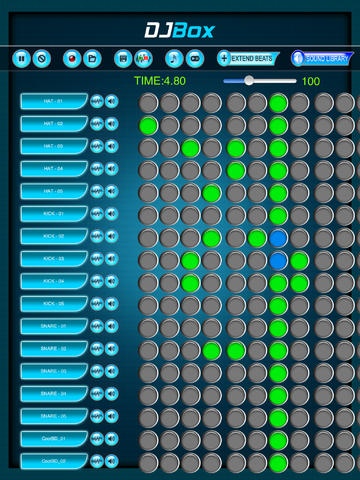
DJ Box HD is a complete customizable music production app that offers a comprehensive range of instrument samples those can be played simultaneously in endless ways. 36 samples are packed in a stunning visual interface that has a timeline along which all instruments can be mixed to produce perfect tunes.
Features Include :
-> DJ Box comes with 36 default samples from different instruments. Just touch each instrument along the timeline and see the app playing.
-> Pitch and volume control for each sound.
-> If 32 columns are not enough over the timeline, you can add any number you want just by tapping on 'Extend Beats' button.
-> Sing along to your beat sequence and record!
-> Save/ e-mail your recorded sound with just one touch. -> Save/ Retrieve the beat patterns in 9 preset slots.
-> Tempo control - Adjustable speed settings while playing the beat sequence. Set BPM from anywhere between 60 to 180.
-> Options sound packs - Beat Studio comes with 5 sound libraries each of which offers high quality samples that suit your requirement.
Mix and Match the samples now to create stunning tunes!!
Kindly share your feedback with us at pinnacle.apps@gmail.com
Requires iOS 5.1.1 or later. Compatible with iPad.
About DJ Box HD
The company that develops DJ Box HD is Vijay Ajerla. The latest version released by its developer is 1.1.
To install DJ Box HD on your iOS device, just click the green Continue To App button above to start the installation process. The app is listed on our website since 2013-05-15 and was downloaded 12 times. We have already checked if the download link is safe, however for your own protection we recommend that you scan the downloaded app with your antivirus. Your antivirus may detect the DJ Box HD as malware if the download link is broken.
How to install DJ Box HD on your iOS device:
- Click on the Continue To App button on our website. This will redirect you to the App Store.
- Once the DJ Box HD is shown in the iTunes listing of your iOS device, you can start its download and installation. Tap on the GET button to the right of the app to start downloading it.
- If you are not logged-in the iOS appstore app, you'll be prompted for your your Apple ID and/or password.
- After DJ Box HD is downloaded, you'll see an INSTALL button to the right. Tap on it to start the actual installation of the iOS app.
- Once installation is finished you can tap on the OPEN button to start it. Its icon will also be added to your device home screen.
